
Feature · Payroll
One number for pay and billing
CareKindle builds each staff member’s timesheet from their EVV-verified visits, priced at the same scheduled time your invoices are priced from, so payroll and billing can never quote two different numbers for the same visit. If a shift genuinely runs long, it’s flagged for a person to review before either figure is touched.
Key capabilities
Pay and billing, priced from one number.
Timesheets that build themselves
Each confirmed visit drops its priced hours onto the staff member’s timesheet.
One number, never two
Hours are priced at the scheduled time, the same figure the invoice uses.
Drifting clock-outs held for review
An early or late clock-out is flagged, never paid or billed on a guess.
Rates that never reach back
Every visit is paid at the rate in force on the day it happened.
In the product
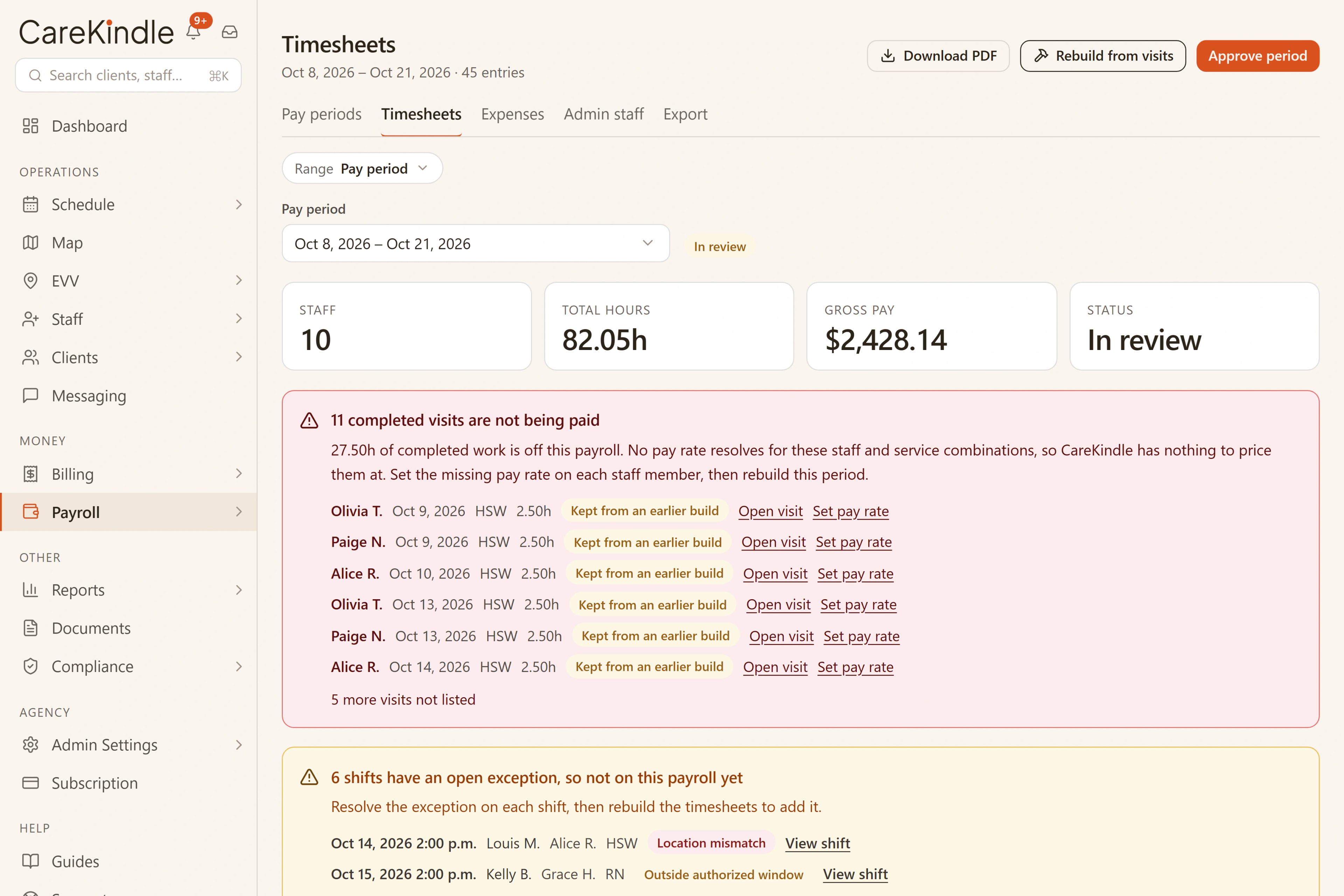
Timesheets that build themselves, priced to match every invoice
Every confirmed visit is priced at its scheduled time, the exact figure the client’s invoice is priced from too. There is no second spreadsheet to keep, no hours to retype, and no way for pay and billing to quietly disagree about the same visit.
- Hours priced at the visit’s scheduled time, the same figure billing uses, never re-entered
- Payroll and the client’s invoice always agree, because they’re priced from one number
- A clock-out that runs unusually early or late is flagged for review, never silently paid or billed on a guess
- No separate timesheet to chase, reconcile or retype

Also in this view
- Each visit paid at the rate that was in force on the day it happened
- Overtime paid at your rate, from the same daily and weekly limits that flag it on the schedule, employees only, and shown on its own in the timesheet and the export
- Turn it on and staff claim mileage and out-of-pocket expenses from their phone, receipt photo attached; the office approves once and they are reimbursed with the same pay period, priced at your per-kilometre rate, kept apart from gross pay in the export, billed to the client when you choose (expenses at cost, mileage at your own client rate), and shown to the family with its receipt only if you share it
- Office staff log their own hours (a line per day) and their expenses and mileage from their account menu, on a phone too, kept as a draft and sent together as one time sheet when the pay period ends, with reminders that follow your payroll cycle; the approver you name for each person (or anyone with payroll access) approves the time sheet, returns it for correction or declines it with a comment, each step kept in their submission history, nobody approves their own, managers can enter hours for them, and they are paid from their own per-period summary, kept apart from staff payroll
From the door to the pay period
The hours travel one path, start to finish
The visit is verified
A staff member checks in and out at the door, and the visit is verified against where and when it happened.
One scheduled time prices it all
The visit’s scheduled time is what both payroll and the client’s invoice are priced from, never two different clocks, never two different numbers.
The timesheet builds itself
Each confirmed visit drops its priced hours straight onto the staff member’s timesheet, no retyping.
You approve the period
Open the pay period, see every staff member’s totals, and approve from the same figures the client is billed from.
Before you pay it
A period you can review before you pay it
Open the pay period and see each staff member’s visits and totals side by side, with anything that needed a person’s eyes, including any clock-out that drifted from its schedule, already settled in the verification queue. Pay rates are a rate card rather than a log you can only add to: each service code shows the rate in effect, with the history behind it, and changing a rate keeps the old one on record so earlier timesheets are untouched. A single shift can also carry its own pay rate, ahead of the card, for the one night that was different. You approve from the same hours the client is billed for, priced the way the invoice is priced.
- Each staff member’s visits and hours totalled for the period
- Your own payroll cycle: every two weeks, monthly, or two to four times a month. Each period opens by itself, and its timesheets are ready the morning after it ends, waiting for your approval
- Flagged visits resolved in verification before they reach the timesheet
- A clock-out that drifts from its schedule, early or late, is held for review, in both directions
- A rate card per staff member: the rate in effect for each service code, and the history behind it
- Every visit paid at the rate in force on the day of the visit, so earlier periods never move
- A completed visit keeps the exact rate it settled at. A later catalogue change cannot reach back into it
- One shift can carry its own pay rate, without changing the rate for anything else
- A client can carry its own pay rate for a service, used ahead of each staff member’s own rate
- A new rate starts on the date you choose, never inside a pay period already exported or closed
- A staff member’s pay rates are editable by owners and admins only, and every change is recorded with the previous amount
- Every total traces back to a visit, priced the same way the client’s invoice is
The hours belong to someone.
Every line on the timesheet is a staff member who showed up, at a door, at the start of a shift, for someone counting on them. Getting their pay right, to the minute, is the least the work deserves.

One number for pay and billing, never two different answers for the same visit.
Every total on the timesheet is priced from the same scheduled time as the client’s invoice, so the two can never quietly disagree.
- Hours priced from the visit’s scheduled time, the same figure billing uses
- Paid at the rate in force on the visit date
- A drifting clock-out is flagged for review, never silently paid or billed
- Health-privacy aligned (PHIPA/PIPEDA)
- Bilingual EN/FR
Works with
One platform, so the work carries on.
Each feature reads from the same records, so what happens here is ready for the next step without retyping.
Billing & claims
Invoices from verified visits, the right tax for your region on every one, books that export.
Visit verification
GPS check-in and check-out; anything off lands in a queue a person reviews.
Scheduling
Build the week on a board that flags conflicts and counts what is still open.
Run payroll from the same number billing uses.
14-day trial · full access · no credit card.