
GUIDE
Keep every caregiver credential current
A lapsed First Aid card or an expired police check can stop a visit before it starts. CareKindle keeps each caregiver record and its expiry dates in one place so nothing slips past renewal.
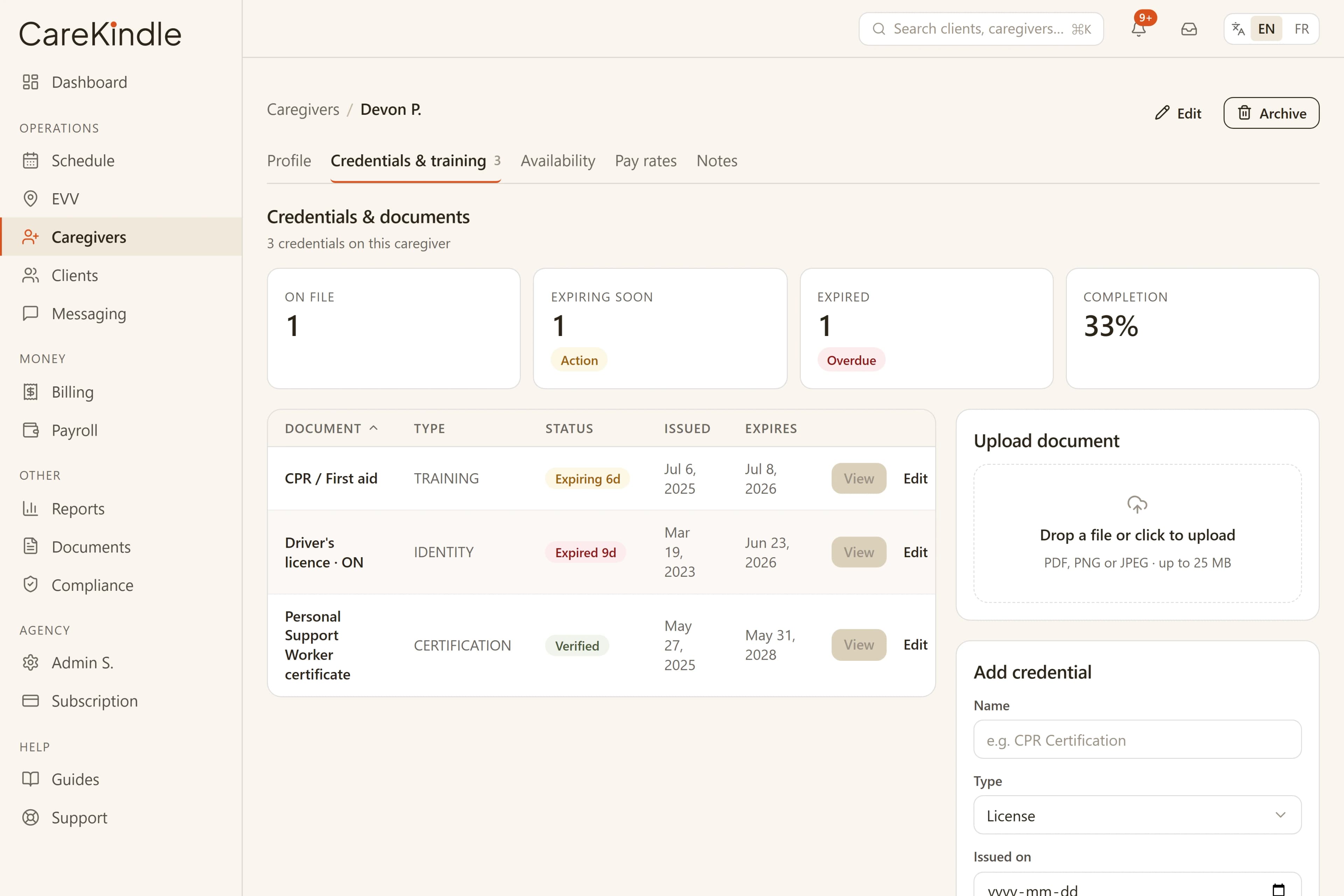
Track every credential and its expiry date
Each caregiver carries a stack of documents: First Aid and CPR, a vulnerable-sector police check, professional registration where it applies, immunization records, and any agency-specific training. Spread across email and filing cabinets, the renewal dates are easy to lose.
In CareKindle, each credential lives on the caregiver record alongside the date it was issued, the date it expires, and the file you collected to back it up. Instead of hunting through paper, your coordinators see at a glance what is verified, what is close to lapsing, and what has already expired.
Some documents are must-haves and some are nice-to-haves. You can mark a credential as optional so it never blocks onboarding and is clearly labelled as optional, while the required ones stay front and centre.
- One profile per caregiver with each credential, its issue and expiry dates, and the document on file
- A clear status — Verified, Pending, Expiring, Expired, or Optional — so current, expiring soon, and lapsed are easy to tell apart
- A single source of truth your whole office works from
Catch renewals before they lapse
The hard part is not storing a date. It is acting on it before the deadline. A credential that quietly expires in the background is the kind of gap that surfaces at the worst possible moment.
CareKindle runs a daily check on your required credentials and, when one is within 30 days of expiring or has recently lapsed, emails your owners and admins a digest and drops a notification in the office. From there it is one click to the caregivers list, filtered to exactly the people who need attention.
That early warning lets your team give caregivers notice and collect the renewed document in good time. Your roster stays ready and your records stay tidy, without a spreadsheet of reminder dates to maintain by hand. Which credentials are required, and following up to renew them, stays in your hands.
- A daily digest of required credentials expiring within 30 days or recently lapsed
- Email to owners and admins plus an in-app notification — no caregiver details in the alert itself
- A one-click jump to the caregivers who need a renewal
Move new hires through onboarding cleanly
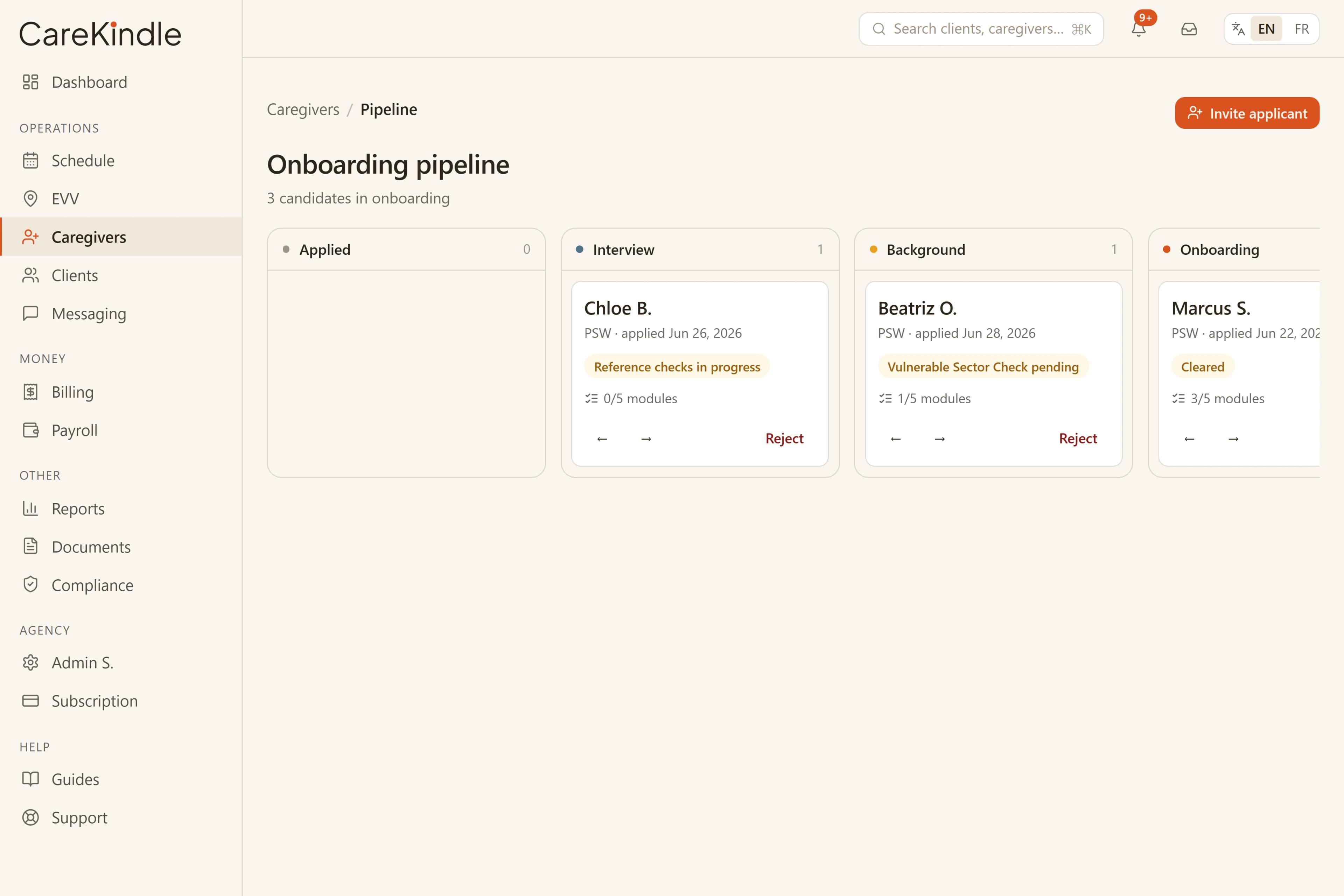
Hiring is where the credential file is built. As an applicant moves from interview to offer to active caregiver, you gather their documents, confirm the references and checks your agency requires, and record what you have collected.
Keeping that intake in CareKindle means the paperwork you verify during hiring becomes the same record you rely on later. There is no re-keying from a separate hiring tool, and a caregiver reaches their first shift with a complete, dated file behind them.
- Capture required documents as part of bringing a caregiver on
- Record references and checks against the caregiver record
- Carry the same file forward from applicant to active staff
Do not schedule an out-of-date caregiver
A current credential file only protects a client if it is checked at the moment of scheduling. The goal is simple: a caregiver with an expired must-have document should not be the one sent on a visit.
Because credentials and the schedule sit in the same system, CareKindle checks a caregiver’s required credentials as the assignment is built — judged against the visit’s own scheduled start, so a document that will have lapsed by then is caught even if it is still valid today. A mismatch is flagged on the visit as a conflict for your coordinator to resolve, rather than surfacing after the visit is booked. That keeps assignments defensible and gives families consistent, qualified care.
This supports the practices your agency follows under PHIPA and PIPEDA; CareKindle is built to stay aligned with them, and the responsibility for which credentials are required and current remains with your agency.
When a caregiver leaves the roster
Keeping the roster current also means cleanly retiring people who are no longer working with you. Archiving a caregiver in CareKindle stops them being assigned to future visits and ends their access to the CareKindle app at once — any signed-in session on their phone is invalidated immediately, not on next login. Their future, not-yet-started shifts are released back to the board so a scheduler can re-staff them.
Archiving is about future work, not past pay. A caregiver who is archived after their completed visits were approved is still paid for that work; only upcoming assignments and app access are removed. And if someone clocks in but forgets to clock out, the app stops accepting a self clock-out once the shift ended more than the window your agency sets (three hours by default) ago — the office records the clock-out instead, so worked time and pay stay honest.
- Archiving revokes app access immediately and unassigns future shifts for re-staffing
- Completed, approved work is still paid — archiving only stops what comes next
- A forgotten clock-out past the agency’s cutoff is recorded by the office, not self-claimed
Keep every caregiver ready, and every visit covered.
14-day trial · full access · no credit card.