
GUIDE
Pay for care that actually happened
Every visit your caregivers clock in and out of becomes a line on a timesheet. CareKindle carries those verified hours straight through to payroll, so you stop re-typing the same numbers and start paying from a single source of truth — employees and contractors alike.
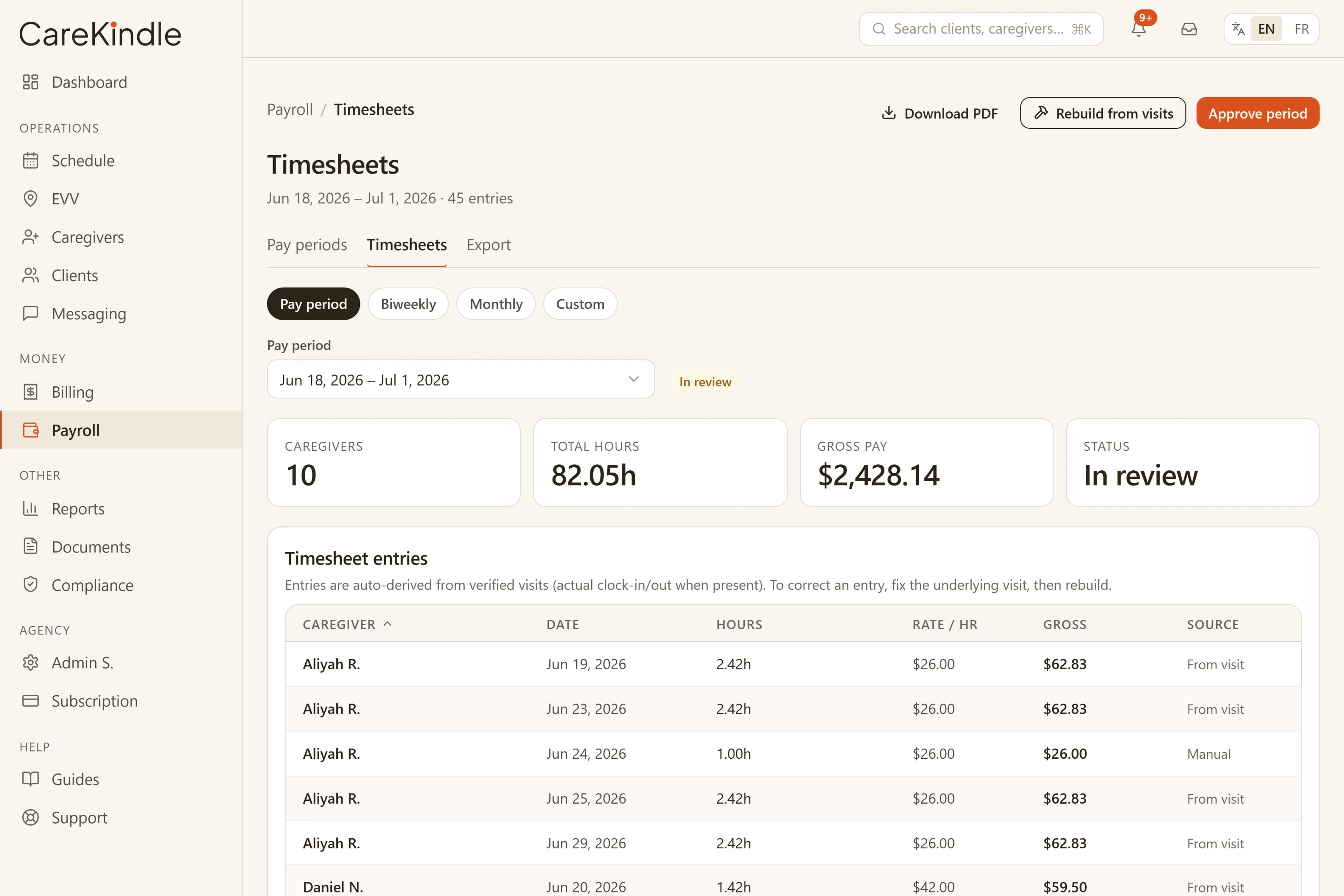
From a verified visit to a timesheet line
When a caregiver clocks in and out of a scheduled visit, CareKindle records the real start and end times, not just the planned ones. Electronic visit verification (EVV) ties those times to the visit, the client, and the caregiver who delivered the care.
Those verified visits are the raw material for payroll. Instead of asking caregivers to fill in a separate paper or spreadsheet timesheet at the end of the week, the hours they already logged in the field roll up automatically into a timesheet you can review. Worked minutes come from the actual clock-in to clock-out span when both exist, and fall back to the scheduled time when they do not.
- Clock-in and clock-out times come from the visit itself, not a second hand-entered record.
- Each line keeps the caregiver, client, and visit it came from, so totals stay traceable.
- Planned versus actual time is visible, so short or long visits are easy to spot.
Clock-outs that stay honest
A forgotten shift should not be self-completed days late and quietly record wildly wrong hours. So a caregiver cannot clock out much past the visit’s scheduled end — the window is configurable in Settings and defaults to three hours.
Past that window the caregiver’s own clock-out is blocked, and the office records the clock-out instead. Office and admin entries are exempt from the cutoff precisely so staff can correct a genuinely late finish, and that correction is logged like any other sensitive action.
- Caregivers clock out within the agency’s window (three hours past the scheduled end by default).
- Past the window the office records the clock-out, so a real late finish is still captured.
- The cutoff keeps an abandoned shift from booking hours nobody worked.
Cut the manual re-entry that creates errors
Re-keying hours from one system into another is slow and quietly expensive. A transposed digit or a missed visit can mean an underpaid caregiver, an overpaid one, or a billing total that no longer matches what was delivered.
Because the timesheet is built from the same verified visits you already scheduled and tracked, there is far less to type by hand. You review and adjust the exceptions rather than rebuilding the whole period from notes.
When something needs a change, you correct it once. The visit record, the timesheet, and your reporting stay in step instead of drifting apart across spreadsheets.
Pay for the care that was actually delivered
Scheduled hours and delivered hours are not always the same. Visits run long, get cut short, get missed, or get covered by a different caregiver. Paying from the schedule alone can quietly drift away from reality.
Verified visits keep payroll honest in both directions. Caregivers are paid for the time they actually worked, and you have a clear record behind every hour when a caregiver or an auditor asks how a number was reached.
Cancellations are handled cleanly. When the office cancels a visit it can charge the client a late-cancellation fee — entered at cancel time, with a reason — without paying the caregiver, since payroll only pays completed visits. That fee shows up as a "Late cancellation" line on the client’s next invoice. A visit that is already in progress can’t be cancelled out from under the caregiver; you clock it out to pay for the time worked instead.
- Actual clock times drive pay, so long, short, and missed visits are reflected fairly.
- Every paid hour traces back to a specific verified visit for review.
- Late-cancellation fees bill the client without ever paying the caregiver for a visit that didn’t happen.
Employees and contractors, paid the right way
Home-care agencies usually run a mix of T4 employees and self-employed contractors, and the two are paid through different channels. CareKindle keeps them straight without making you split the work yourself.
When you finalize an approved pay period, employees and contractors come out together in one unified payroll CSV — each line tagged with its employment type — so no caregiver is silently dropped and you can hand the file to any payroll provider or accountant. If you connect QuickBooks, you can also push contractor pay live as QuickBooks Bills (accounts payable), while employees stay on the CSV. Each pay line records the caregiver’s employee-or-contractor type at the moment it was built, so reclassifying someone mid-period never moves already-built pay between the two paths.
The CSV is just a file: you can download it as many times as you need. Re-downloading re-serves the exact same file rebuilt from the approved entries — it never records a second export, never re-pays anyone, and never re-syncs to QuickBooks.
- One CSV covers employees and contractors, each line marked with its employment type.
- Contractor pay can sync live to QuickBooks as Bills; employees stay on the CSV.
- Re-download the CSV any number of times — same file, no double pay, no re-sync.
A final paycheck that’s still correct
When a caregiver leaves, you still owe them for the work they already did. Archiving a caregiver stops future assignments and revokes their app access, but it never forfeits earned wages: a caregiver archived after their completed work was approved is still paid for that work in the period it belongs to.
That keeps offboarding simple. You remove someone from the active roster the moment they leave, and the pay period they were part of still pays out exactly what they earned.
Guardrails that catch the expensive mistakes
Payroll and billing are where small slips cost real money, so CareKindle blocks the common ones before they ship. On payroll, you can’t approve an empty pay period, and a visit with no pay rate configured is skipped and logged — rather than building a $0 line that silently underpays — so the office sets the rate and rebuilds.
On the billing side the same care applies. An invoice is blocked when it would total $0 because no rate was found, when it’s marked taxable but the client has no province on file (which CareKindle needs to compute GST/HST), and when an invoice already covers the exact same period for that client — so you can’t double-bill the same dates. And once an invoice has payments recorded against it, it can no longer be voided; you reverse the payments first.
For payer-funded care, every billed visit must fall entirely within its authorization’s coverage period (checked against the visit’s end), and a visit’s linked authorization locks once the visit is in progress or completed so the basis you billed against can’t shift underneath you.
- Empty pay periods can’t be approved, and rate-less visits are skipped, not paid at $0.
- Invoices are blocked at $0, when a taxable client has no province, and on duplicate periods.
- Visits must sit inside their authorization window; a paid invoice can’t be voided.
Review, approve, and hand off to your payroll system
Once a pay period closes, you can review timesheets by caregiver, catch the exceptions that need a human decision, and approve the rest. The goal is a short, focused review rather than a from-scratch rebuild.
CareKindle is built to align with PHIPA and PIPEDA, and sensitive actions are tracked so you keep a record of who approved what and when. CareKindle does not file your payroll taxes or replace your accountant; it gets clean, verified hours ready so your existing payroll and bookkeeping tools — CSV or QuickBooks — have accurate numbers to work from.
- Review by caregiver and pay period, focusing on exceptions first.
- Approvals and changes are tracked for your own records.
- Hand verified hours off to your existing payroll and bookkeeping workflow.
Spend payroll day reviewing hours, not re-typing them.
14-day trial · full access · no credit card.